Showing posts with label DVD. Show all posts

Tuesday, February 23, 2010

show photo slideshows on TV as the DVD slideshow style

How to show your photo slideshow  on TV easily ?The way is to use the photo slideshow DVD to make photo slideshow DVD ,then play the photo slideshow DVD on DVD player.

With DVD Photo Slideshow  tool, you are allowed to burn photos to  DVD. With some simple clicks, you are able  to make dynamic photo slideshow DVD and movie.  DVD Photo Slideshow is impressing and appealing, which can express your feelings as flash photo slideshow movie.By using DVD Photo Slideshow tool,you can easily burn photos to DVD,convert photos to all kinds of slideshow video for iPod,iPhone or iPad.You can also use DVD Photo Slideshow to create MP4 movie,3GP video for all kinds of mobile phones.
How to burn your Photos to DVD and Play on TV with DVD Player to show photo slideshows on TV ?


You need to download the Photo DVD Slideshow software and install it. After successfully launch Photo DVD Slideshow, you can follow 3 simple steps to create and organize your photo slideshow albums, set disc DVD menu, burn your photo albums on a blank DVD-R/RW, DVD+R/RW, CD-R or CD-RW disc. After finish making ,you can enjoy your creative photo slideshows on TV by  a DVD/VCD player.

Step 1. Create and organize photo album
When you run Photo DVD Slideshow, it automatically opens a new project and lets you start creating a slideshow. A new project always uses Photo DVD Slideshow's default project settings. To see and modify these settings based on your Options.

Then click the Organize Photos button to create at least one photo album and select photos from a folder on your hard drive and add them to a particular album. After creating a photo album, you can customize the photo album by adding, deleting photos, arranging the order of photos during slideshow playback, adding captions for photos, selecting transition effects
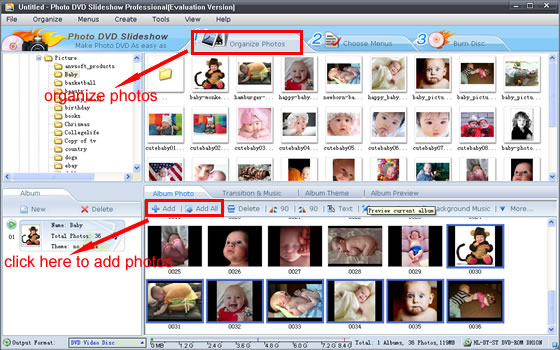

If you are not satisfied with your selection, you can click the thumbnail of the photo album from the Photo Album area (the left-down panel) to select an album you want to remove from the slideshow, but do not worry, when you delete a photo album, all photos inside the album will be removed, but the original photos will not be deleted physically from your hard drive.


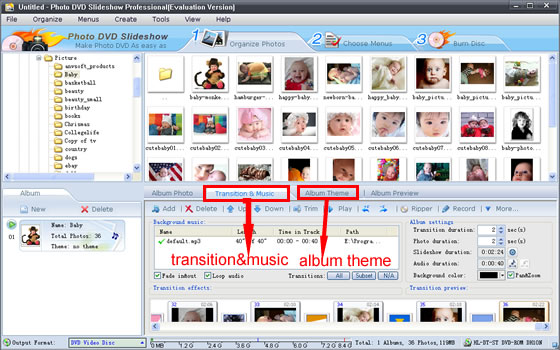
When clicking the Music & Transition Effects tab, you may add background music and select your desired transition effects from more than 260 amazing special transition effects. You may also apply Pan & Zoom effect to your creative works. The Preview window gives you ideas of how your slides will show on TV with DVD player.
Then you can preview what you have selected by clicking the Preview tab and can also stop playing by clicking Stop button.

Step 2. Design your DVD disc playing menu


Once you have all your photo albums ready, it’s time to build a DVD-style menu system. Click the Choose Menus button to select a template of disc menu which decides how the photo album will be shown on your photo CD or DVD disc. You can edit the disc menu by adding your favorite background music in WAV or MP3 format and background image in JPEG, JPG, TIF, GIF, BMP format to the selected disc menu. You may select the pull-down menu in the right column to check out the predefined disc menu templates that come with the software.
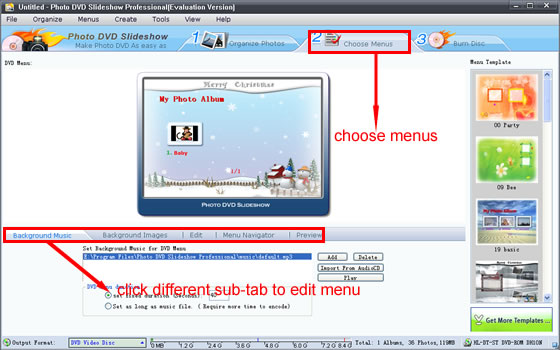
In this Choose Menus window, you may preview your photo albums: Click the Preview tab, you’ll get a preview of your slide show with DVD remote-control testing. With the simulation of a TV and a DVD player remote control, you can view your photo album exactly as what you will watch on TV with DVD or VCD player.


Step 3. Burn photo slideshow albums to DVD disc

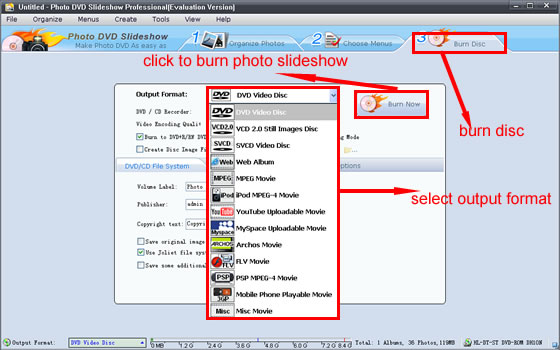
Click the Burn DVD button to burn your photo albums to a blank DVD+R/RW or DVD-R/RW disc. Before burning, some parameters must be set including:

The DVD File System tab:
In this tab, you can input the Volume Label, Publisher and Copyright text.You may also choose to Save original images and music files on disc and Use Joliet file system for long file name.

The TV System tab:
This tab enables you Select PAL or NTSC format, choose TV cropping value, and whether applying anti-flickering filter.
Notes: The NTSC and PAL are two different standard protocols for television (TV) broadcast transmission and reception. The NTSC standard is used in the United States while PAL is used in other parts of the world. You can select the radio button of PAL or NTSC according to the standard selected in your country.

The DVD Recorder Options tab:

In this tab, you can select the options of the recording speed, simulating and the Burn-proof disc protection.
Speed - If your drive supports multiple speeds, this selection allows you to change the speed at which the disk is written. If you encounter problems when burning your disc, try lowering this setting.
Simulate - When checked, the disc will not actually be burned. The software will test the burning process to see if it functions correctly, but will not actually write the data.
Copies - Specifies the number of copies to make of the disc. If you would like to make more than one copy, enter the number of copies to make here.

After you set the above parameters, you may click the Burn Now button and you creative slideshow will be burned to a DVD disc.


After  your photo slideshow DVD disc is recorded, you can play it by using DVD player on your computer at first. It the slideshow DVD is OK, you can play it on your DVD player with TV .You can see that your photo slideshows will be showed on your TV .

Tuesday, February 2, 2010

What functions should a good photo slideshow software need


Above is a YouTube Christmas photo slideshow I made with  DVD Photo Slideshow tool

People often want to show their digital photos as the photo slideshow style.There are many photo slideshow softwares can help people make photo slideshow.For example,DVD Photo Slideshow,an excellent photo slideshow DVD burner,photo slideshow video creator ,photo slideshow movie maker or web photo slideshow album builder.DVD Photo Slideshow as the professonal photo slideshow creator,it can help people to make photo slideshow with all kinds of format,such as watch photo slide show on TV,publish photo slide show on YouTube,share photo slide show on Facebook,show friends web photo slide show on website,enjoy photo slideshow on Apple iPod,Apple iPhone and other mobile devide.

Some key features of dvd photo slideshow I find after I use:

DVD Photo Slideshow converts digital photos into exciting DVD movies or videos and create photo slideshows on iPod, Zune, PSP and Cell Phones.It is good to enjoy your photo slideshow with DVD Photo Slideshow.DVD Photo Slideshow strengthens all its original merits such as multiple transition effects, background music, adjustable slideshow duration and editable text showed on photos. Just add your photos to your slide show, and enhance it with text captions, transitions, ken burns effects, music and pre-designed DVD menu styles, etc.

1.Create a digital photo slideshow with all kinds of photo slideshow theme template style

Breathe life into your digital photos by adding stunning special photo slideshow transitions, soundtracks, ken burns-styled motion photo slideshow effects and DVD slideshow menu with drag-and-drop ease. Additional DVD styles are provided for free and added regularly.

2.Share your stories in entertaining ways by the photo slideshow style

Burn your photo slideshow into a  slideshow video  (DVD, VCD or SVCD) for play back on TV. You can also generate standalone photo slideshow video files of your slideshow in AVI, MPEG, WMV, MP4 format, share the memories on iPod, Zune,mobile phone.

3.Create and burn your photo slideshow DVD or CD with simple clicks

DVD Photo Slideshow enables you to create your own digital photo slideshow album easily. After the preview of your slide show created, you can easily burn them into a blank DVD or CD disc that can be enjoyed both on your PC and TV with a DVD or VCD player. Within a few minutes of work, you'll have an eye-catching photo slide show with DVD, SVCD, VCD, MPEG, MP4, FLV (Flash for Video) as output formats.

4.Watch and share your digital photos on TV, PC, mobile device, website, YouTube, MySpace,Facebook

DVD Photo Slideshow can quickly and easily produce professional-looking photo slide show DVD disc or MPEG photo slideshow video files and share digital photo albums on home big screen TV, computer, website, iPod, PSP, YouTube, MySpace and Facebook.

5.Save and organize your digital Photos

With this digital photo slideshow album software, you can easily backup hundreds of your favorite high-resolution photo slideshow into a DVD or CD disc that is accessible by your PC. You can share your creative photo slideshow  DVD or CD discs with friends, family, clients or colleagues easily.

Wednesday, January 27, 2010

How to create wedding photo slideshow DVD and play on Apple TV


How to burn digital wedding photographs to wedding slideshow DVD and play on Apple TV ? - Cheap wedding Dresses

It seems that this is a cool topic for many photographers.As a photographer,I have taken lots of digital wedding photographs for the brides and bridegrooms at the wedding ceremony.The brides and bridegrooms always want to show their memories to their friends,relatives and others.But they do not have a good and convenient way to show therir wedding photographs.As the wedding photographer,I ought to help them.
With the development of digital photograph technology,more and more digital photo convertor and editor can help you show your digital photographs on all kinds of platforms.I like to use the Photo DVD Maker software to burn all my digital photos to the DVD disc and play it on the Apple TV with a DVD player.By this way,I can burn lots of my digital photographs to the photo slideshow DVD at a time.And this way can also help me backup all my digtial photos well.It is the most convenient way for me to backup and show my digital photos I think.

Now,let's come back to the topic.How to create a digital wedding photo slideshow DVD and play on Apple TV with DVD palyer ? It is very simple to do that.There are all kinds of photo slideshow DVD Maker on the internet.You can download a Wedding Photo DVD Maker to make your wedding photo slideshow DVD easily for free.As for me,I like to use DVD Photo Slideshow Professional to make my own Photo Slideshow DVD.This is an easy to use photo DVD Maker for the brides and bridegrooms to create their digital photo slideshow DVD to show their wedding photos.How to make a digtial wedding photo slideshow DVD ? I will guide how to make a digital wedding photo slideshow DVD.

Before making,you should download the free trial Photo DVD Maker from the product website and install it on your computer.After installing,there are some simple steps for you to make a beautiful digital wedding photo slideshow DVD .

Let's begin to create a beautiful and sweet wedding photo slideshow DVD now.

Step1:Organize wedding photos and Create photo album:
Click the Organize Photos button to create at least one wedding photo album and select the digital wedding photos from your computer and add them to wedding photo album. After creating a wedding photo album, you can customize the wedding photo album by adding, deleting photos, arranging the order of photos during slideshow playback, adding captions for photos, selecting photo transition effects.


If you are not satisfied with your wedding photo album, you can click the thumbnail of the photo album from the Photo Album area (the left-down panel) to select an wedding album you want to remove from the photo slideshow, but do not worry, when you delete a wedding photo album, all wedding photographs inside the wedding photograph album will be removed, but the original wedding photographs in your computer hard drive will not be deleted.

When clicking the Music & Transition Effects tab, you can add a your wedding background music and select photo transition effects from more than 260 amazing special photo transition effects.

You can also apply Pan & Zoom effect to your creative works. The Preview window gives you ideas of how your wedding photo slideshows will show on TV with DVD player.Then you can preview what you have selected by clicking the Preview tab and can also stop playing by clicking stop button.


When click the Album Theme tab, you can select one wedding photo album theme from theme warehouse to add to the wedding photo album. You can also design the theme by setting all kinds of parameters such as the Title, Duration, Effect, Font size. Then click the Album Preview tab, you can preview the wedding slideshow theme effect of the wedding photo album. In the Choose theme window, you can Preview tab to preview your photo album theme effect easily. If you are not satisfactory with your MySpace photo album theme, you can try another theme freely.

Step2: Design your wedding slideshow DVD playing menu:

Once you have all your wedding photo album ready, it’s time to build a DVD-style playing menu system. Click the Choose Menus button to select a wedding template of DVD menu which decides how the wedding photo album will be shown on your photo DVD disc. You can edit the DVD menu by adding your favorite wedding background music in WAV or MP3 format and wedding background image in JPEG, JPG, TIF, GIF, BMP format to the selected wedding DVD menu. You can also select the pull-down menu in the right column to check out the predefined DVD menu templates that come with DVD Photo Slideshow.


Step 3. Burn the wedding photo albums to DVD disc:

Click the Burn DVD button to burn your wedding photo albums to a blank DVD+R/RW or DVD-R/RW disc.
Before burning, some DVD playing parameters must be set including:
  1. The DVD File System tab:
    In this tab, you can input the Volume Label, Publisher and Copyright text. You may also choose to Save original images and music files on disc and Use Joliet file system for long file name.
  2. The TV System tab:
    This tab enables you Select PAL or NTSC format, choose TV cropping value, and whether applying anti-flickering filter.
    Notes: The NTSC and PAL are two different standard protocols for television (TV) broadcast transmission and reception. The NTSC standard is used in the United States while PAL is used in other parts of the world. You can select the radio button of PAL or NTSC according to the standard selected in your country.
  3. The DVD Recorder Options tab:
    In this tab, you can select the options of the recording speed, simulating and the Burn-proof disc protection.
    • Speed - If your drive supports multiple speeds, this selection allows you to change the speed at which the disk is written. If you encounter problems when burning your disc, try lowering this setting.
    • Simulate - When checked, the disc will not actually be burned. The software will test the burning process to see if it functions correctly, but will not actually write the data.
    • Copies - Specifies the number of copies to make of the disc. If you would like to make more than one copy, enter the number of copies to make here.

After you set the above parameters, you can click the Burn Now button to create your wedding photo slideshow DVD.And the wedding photo albums will be burned to the DVD disc.


After the wedding photo slideshow DVD disc is recorded, you can play it on your computer DVD player.And the wedding photo slideshow will show on your computer screen.If the wedding photo slideshow DVD is OK,you can play it on TV with DVD player now.You will see the wedding slideshow DVD showed on Apple TV with the amazing transition effects and wedding background music.

Now,the process of making a wedding photo slideshow DVD is finished.You can have a try the way to make your own beautiful wedding slideshow DVD to show your sweet wedding memories easily.

Wednesday, January 20, 2010

How to burn digital photos to DVD disc and play on Apple TV

People often want to backup or share their photos with friends,but they do not have a good way to share their photos.How to share or show photos easily and conveniently ?I think that a way that burning photos to DVD and play DVD on Apple TV with DVD player is lost convenient for people.
How to burn your photos to DVD and play on AppleTV ? There are 3 simple ways can guild you do burn your photos to DVD to play on your Apple TV.Before doing this,you have to
download and install a Photo DVD Maker software.I like DVD Photo Slideshow Professional 7.97. You can download and install it for free so as to show your photos on Apple TV.( http://www.dvd-photo-slideshow.com )

Now,let's begin to burn photos to DVD dsic.

Step 1. Organize photos and create albums:


When you run DVD Photo Slideshow, it automatically opens a new project and lets you start creating a slideshow. A new project always uses DVD Photo Slideshow's default project settings. To see and modify these settings based on your Options.

Then click the Organize Photos button to create at least one photo album and select photos from a folder on your hard drive and add them to a particular album. After creating a photo album, you can customize the photo album by adding, deleting photos, arranging the order of photos during slideshow playback, adding captions for photos, selecting transition effects.


If you are not satisfied with your selection, you can click the thumbnail of the photo album from the Photo Album area (the left-down panel) to select an album you want to remove from the slideshow, but do not worry, when you delete a photo album, all photos inside the album will be removed, but the original photos will not be deleted physically from your hard drive.

When clicking the Music & Transition Effects tab, you may add background music and select your desired transition effects from more than 260 amazing special transition effects.

You may also apply Pan & Zoom effect to your creative works. The Preview window gives you ideas of how your slides will show on TV with DVD player.
Then you can preview what you have selected by clicking the Preview tab and can also stop playing by clicking Stop button.


Step 2. Design your disc menu:

Once you have all your photo albums ready, it's time to build a DVD-style menu system. Click the Choose Menus button to select a template of disc menu which decides how the photo album will be shown on your photo slideshow DVD disc. You can edit the disc menu by adding your favorite background music in WAV or MP3 format and background image in JPEG, JPG, TIF, GIF, BMP format to the selected disc menu. You may select the pull-down menu in the right column to check out the predefined DVD disc menu templates that come with the software.


In this Choose Menus window, you may preview your photo slideshow albums: Click the Preview tab, you can get a preview of your slide show with DVD remote-control testing. With the simulation of a TV and a DVD player remote control, you can view your photo album exactly as what you will watch on Apple TV with DVD player.

Step 3. Burn photo albums to DVD disc:

Click the Burn DVD button to burn your photo slideshow albums to a blank DVD+R/RW or DVD-R/RW disc. Before burning, some parameters must be set including:
1.The DVD File System tab:
In this tab, you can input the Volume Label, Publisher and Copyright text. You may also choose to Save original images and music files on disc and Use Joliet file system for long file name.
2.The TV System tab:
This tab enables you Select PAL or NTSC format, choose TV cropping value, and whether applying anti-flickering filter.
Notes: The NTSC and PAL are two different standard protocols for television (TV) broadcast transmission and reception. The NTSC standard is used in the United States while PAL is used in other parts of the world. You can select the radio button of PAL or NTSC according to the standard selected in your country.
3.The DVD Recorder Options tab:
In this tab, you can select the options of the recording speed, simulating and the Burn-proof disc protection.
a. Speed - If your drive supports multiple speeds, this selection allows you to change the
b. Speed at which the disk is written. If you encounter problems when burning your disc, try lowering this setting.
c. Simulate - When checked, the disc will not actually be burned. The software will test the burning process to see if it functions correctly, but will not actually write the data.
d. Copies - Specifies the number of copies to make of the disc. If you would like to make more than one copy, enter the number of copies to make here.

After you set the above parameters, you may click the Burn Now button and you creative photo slideshow will be burned to a DVD disc.


Once your photo slideshow DVD disc is recorded, you may play it into your DVD player and the photo slide show will show on your TV with amazing transition effects and background music.

And you can also know more how to burn photos to DVD and play on TV with DVD player.


How to convert photographs to MPEG video for Apple iPhone or other mobile phone


How to show off photographs on Apple iPhone or other mobile phone ? The best way is to make mobile photograph slideshow as the video format to show photos.The dynamic mobile phone photograph slideshow can allow you to share your photographswith friends more easily than than the original still photographs.The photo slideshow video can is more convenient than the still photographs to show off yourself.


How to convert photographs to MPEG Video File for Apple iPhone or other mobile phone ? DVD Photo Slideshow Professional is the mobile phone photo slideshow software that helps you generate MPEG video files for Apple iPhone or other mobile phone.By the help of dvd photo slideshow software,you can share your photograph slideshow on Apple iPhone or other mobile phone easily.


You need to download the Mobile Phone Video Maker and install it at first. Then there are just1,2,3 steps to finish the photographs conversion process easily.


Step 1. Organize photographs and create photograph album


Then click the Organize Photos button to create one or more photo album(now I create one photo album) and select photographs from a folder in your computer hard drive and add them to the particular photo album. After creating a photo album, you can customize the photo album by adding, deleting photos, arranging the order of photographs during slideshow playback, adding captions for photos, selecting transition effects.


mobile phone photo slideshow


If you are not satisfied with your selection, you can click the thumbnail of the photo album from the Photo Album area (the left-down panel) to select an album you want to remove from the photo slideshow, but do not worry, when you delete a photo albums, all photos inside the album will be removed, but the original photos in your computer hard drive will not be deleted.


Step 2. Add transition music, choose and design photo album theme


When you click Music & Transition Effects tab,you can add the background music to the photo album and select your desired transition effects from more than 260 amazing special transition effects. You can also add the same or different background music to the different photo album (if you create more than one photo albums)

mobile phone photo slideshow


When click the Album Theme tab, you can select one album theme from themes warehouse to add to the selected photo album. You can also design the theme by setting all kinds of parameters such as the Title, Duration, Effect, Font size. Then click the Album Preview tab, you can preview the theme effect of the photo album. In the Choose theme window, you can Preview tab to preview your photo album theme effect easily. If you are not satisfactory with your photo album theme, you can try another theme freely.


cell phone photograph slideshow.


Step 3. Convert photograph albums to MPEG video files for mobile phone


Click the Burn Disc button to the burning window, then click the pull-down menu to choose the Output Format 긗obile Phone Playable Movie? And in the Parameters Settings, you can set all kinds of parameters you like and choose the output file right for your Apple iPhone or other mobile phone. As for me, I choose MPEG-4 Movie(*.mp4) as the output file for Apple iPhone

After you set the above parameters, you click the Create Now button and your creative mobile phone photograph slideshow video of MPEG Format will be created for your Apple iPhone or other mobile phone.

cell phone photograph slideshow video


Once your mobile phone photo slideshow video created completely, you may play it in your computer first, then use the USB device to connect Apple iPhone or other mobile phone to computer and upload the video to your Apple iPhone or other mobile phone. After uploading completely, you can play the mobile phone photo slideshow video with mobile phone player. You will see the photo slideshow video playing on your Apple iPhone or other mobile phone

You can know more how to make mobile phone slideshow video for Apple iPhone and other mobile phone. www.dvd-photo-slideshow.com/photo_mpeg_video_mobile_phone.html

Digital DVD Photo Slideshow Software to make photo Slideshow DVD for Apple TV,Apple iPod, Zune

Digital DVD Photo Slideshow Software for TV/DVD, Apple iPod, Apple iPhone,Zune, Sony PSP, PDA, MPEG, Website,YouTube,MySpace,Facebook,blog and more!


Digital DVD Photo Slideshow Professionalis a photo slideshow DVD maker that you can use to create dynamic photo slideshow DVD or video with your digital photographs. It allows you to create entertaining photograph slideshows watched on TV or Apple TV, create SWF Flash slideshow for posting to website, generate MPEG video files for mobile devices such as Apple iPod, Zune, Sony PSP, PDA, Apple iPhone and other mobile phone, build photo slideshow video for uploading to YouTube, MySpace and Facebook. Within a few minutes of work, you'll have an eye-catching photo slideshow for TV or Apple TV (with DVD, SVCD, VCD 2.0 output), for Apple iPod, Apple iPhone,Zune, PSP, PDA, mobile phone (MPEG, MPEG-4, 3GP MP4), for MySpace, YouTube (FLV, Web Album as output formats) and Facebook.

DVD Photo Slideshow,The best Photos to DVD slideshow software

DVD Photo Slideshow is the best DVD Photo Slideshow Software to create DVDs from your photo collection. Watch your pictures on any home DVD player. Share your digital pictures on a DVD with friends or family. DVD Photo Slideshow animates your images to make a video DVD Slideshow. You can add optional soundtracks and comments to your pictures using DVD subtitles. The result is attractive and vibrant. The product is very easy to use and burn with almost all DVD writer.

The transitions and animations of your pictures are completely automatic and will enhance the experience of sharing your best memories. You can watch the results on a regular TV,Apple TV,computer using a DVD Player. A copy of your original photo files can be stored in the DVD disc which lets you keep trace of your digital pictures without quality loss using a computer.


Perfect photo slideshow DVD tool for viewing, storing and sharing your photos

With DVD Photo Slideshow, thousands of photographs from holidays, landscapes, wedding or family parties can now be enjoyed on TV, computer or website as high resolution DVD slideshow, Flash slideshow, MPEG encoded slideshow. The program's simplified three-step workflow enables users of all levels to build custom photo slide shows, design on-screen menus, and burn discs for sharing at home, generate MPEG video or Web slideshow.

DVD Photo Slideshow gives photography lovers or photo collectors a new and easy way to view, store and share their pictures from digital camera, scanner or Internet. With just a few clicks, you can use DVD Photo Slideshow to view and edit photo, create and organize your photo album, add background music, burn your photo album on blank DVD+R/RW, DVD-R/RW, CD-R or CD-RW disc or just generate Flash photo slideshow or MPEG/MPEG-4 encoded slideshow. After that, you can show your creative works on TV, PC, website, YouTune, MySpace,Facebook and blog. DVD Photo Slideshow can also archive your original photo files in DVD or CD disc so that you can print or process them in the future.

Click hereto start making photo slideshow on DVD disc>and show slideshow on TV.

Create photo video CD or DVD that play back on your TV with DVD player. Generate MPEG video files for PC viewing. Generate MPEG-4 format files for mobile devices such as Apple iPod, Sony PSP, cellular phone and PDA. Build photo slideshow video ready for upload to your YouTube, MySpace. Create SWF Flash slideshow, perfect for e-mailing or posting online to your website. DVD Photo Slideshow does it all!


More Features of DVD Photo Slideshow include:

1.Create and burn your photo slide show DVD or CD with clicks

DVD Photo Slideshow enables you conveniently create your own digital photo album. After the preview of your slide show created, you can easily burn them onto a blank DVD or CD disc that can be enjoyed both on your PC and TV with a DVD or VCD player. Within a few minutes of work, you'll have an eye-catching slide show with DVD, SVCD, VCD 2.0, MPEG, MP4, FLV, SWF Flash as output formats.

2.Watch and share your photographs on TV, PC, mobile device, website, YouTube ,MySpace,Facebook

DVD Photo Slideshow can quickly and easily produce professional-looking photo slide show DVD disc or MPEG video files and share digital photo albums on home big screen TV, computer, website, iPod, PSP, YouTube, MySpace,Facebook and blog.

3.Save and organize your photo, picture and image

With this photo program, you can easily archive hundreds of your favorite high-resolution photo onto a DVD or CD disc that is accessible by your PC. You can share your archived DVD or CD discs with friends, family, clients or colleagues! For more information about how to make photo DVD or VCD with DVD Photo Slideshow, please visit this helpful 1,2,3 How-To make digital slideshow DVD with photograph slideshow DVD software.

Wednesday, January 13, 2010

DVD Photo Slideshow Professional to make photo slideshow

DVD Photo Slideshow Professional to make photo slideshow ( detailed narration about DVD Photo Slideshow )

Making digital photo album is a good way to save digital photos , but it is not convenient for you to show photos if you don't have a computer on hand. Making a DVD photo slideshow album with DVD Photo Slideshow gives you the best of both worlds. You can make a DVD Photo slideshow disc with photos, music and interactive menus. Even if you have a regular CD-RW drive, you can still create a photo slideshow album that works on most DVD players. Best of all, you can share your photos with anyone who has a TV with a DVD player.

Sometimes,people would like to share their photos with friends.But how to share photos with firends with a cool way?.What is the cool way to share photos with friends easily? As for me,I will make a dynamic photo slideshow DVD or video to share photos with friends on TV.But how to make a photo slideshow DVD ?The way is that you choose an excellent photo slideshow DVD software to achieve that.
Of course, to create a photo slideshow can be using any video editor. But if you do not feel too confident with such photo slideshow editosr, it makes sense to look at the special tool designed exclusively for making photo slideshow. Here is an excellent photo slideshow DVD program will be discussed in this article.
Since the program are designed primarily for home users, they have a fairly simple interface, with which the strength to understand.Typically, a program for creating slideshows have similar features: allow to create a project based on the photos, arrangingphoto in the correct order, to determine the duration of display for each image on the screen, add slideshow transition effects and sound and burn the project to DVD or stored in any other convenient format.
At the interface of DVD Photo Slideshow Professional, as already considered to be  my  photo DVD Slideshow Builder.Its features, resulting in a single window placed a maximum of tool for creating slideshows. Effectively used, even a status bar: it can specify in what format you want to save videos and see how much space your project.
dvd photo slideshow
The photo slideshow program has a built-in file manager, allowing you to preview and select pictures without resorting to other applications for viewing images. In the photo slideshow transition to the folder that contains the photos, the program immediately creates thumbnails. You can add photos to the project by one or a whole folder at once.
Very convenient that the sizes of all elements of the program's interface can be changed. Therefore, after the selection of photos can be, for example, to maximize an area where you put pictures slideshow, by reducing the size of the file manager.
Work on the slideshow is divided into several simple steps. After adding the photos is to determine the order in which they will be displayed on the screen. If the order is incorrect, then it can be changed. Tab Transition & Music, you can work on sound and visual design slideshow. Transition effects between pictures will be added automatically, but you can change those you prefer. It is worth noting that the DVD Photo Slideshow Professional allows you to opt out of transition effects, if you consider them irrelevant.
By clicking on the pictures to the storyboard panel, you can switch to the setting window. While in Photo Configuration, you will be able to determine the slideshow transition effects, and set the animation of each photo. Despite the fact that when you create a slideshow does not use animated images, DVD Photo Slideshow Professional can create psevdoanimatsiyu, adding the effects of pan and zoom images. Such effects are often used to create slideshows and enliven them.
dvd photo slideshow
In the same window Photo Configuration you can add pictures to text labels. These labels can contain text, entered by the user, or added automatically, based on the macro. For example, you can use these macros the current date, the date the picture was taken, file name, number slide, etc.
Another interesting possibility, which deals with registration of the photo slideshow - the large number of vector elements that can be added to the image. You can mark them anywhere in the picture and choose the right size for them. This may be goggles, hats, candles, balloons with text, such as those which can be seen in comic books, etc.
dvd photo slideshow
To place a slideshow is very interesting to use subjects - various thematic framework, which is framed photos. In the program a lot of different themes for the photo collection: holiday, vacation, sports, romance,festival etc.
dvd photo slideshow
In fact, there are templates for creating menus for DVD photo slideshow. It is very convenient that when creating the DVD menu can not be limited to only those templates that are offered in the program, and use as a background image, any image that is on your hard drive. Funds for the menu, of course, are not as flexible as in specialized programs for DVD-authoring, but some freedom of action still exists. So, you can control the display of menus and album name, choose the color elements and background music that will accompany the slideshow.
dvd photo slideshow
After the photo slideshow DVD finishing creating,you can first play it on your computer,then you can play it on TV with DVD player easily.You can also control the DVD menu ro play the slideshow DVD at your pleasure.You can see the dynamic photo slideshows with backgroud music.